Connect a coding agent
This page connects Claude Code, Codex, Cursor or another MCP client to a running Loom
server. Install the plugin (or wire the MCP entry), point it at the server, and work as
usual. The next session starts with what the agent saved. What the Claude Code and Codex
plugins send to Loom is in data
handling. Conversation recording
is off by default; the namespace owner turns it on with the Record conversations
switch on the dashboard's Conversations page, or with conversation.set_logging. To run a
server yourself, start with the quickstart; to have your agent install a
pinned release and prove it works, give it the latest release's
https://github.com/ClickHouse/loom/releases/latest/download/agent-setup.txt (Set up
Loom with your coding agent).
What you need
- The server URL, for example
https://loom.example.com, orhttp://localhost:7777for a stack started withloom up. - A writer token for your namespace, except against a single-user server on the same
machine: there the plugins and the install links for
Cursor and
VS Code connect without one.
Create one in the dashboard at
<server>/settings→ Tokens, or ask an operator to runloom mint-token --subject you --org <org> --namespaces <namespace> --roles writer. On a server with self-signup open, the Claude Code plugin can sign the machine up by itself on the first session. See what happens with no credential.
Claude Code
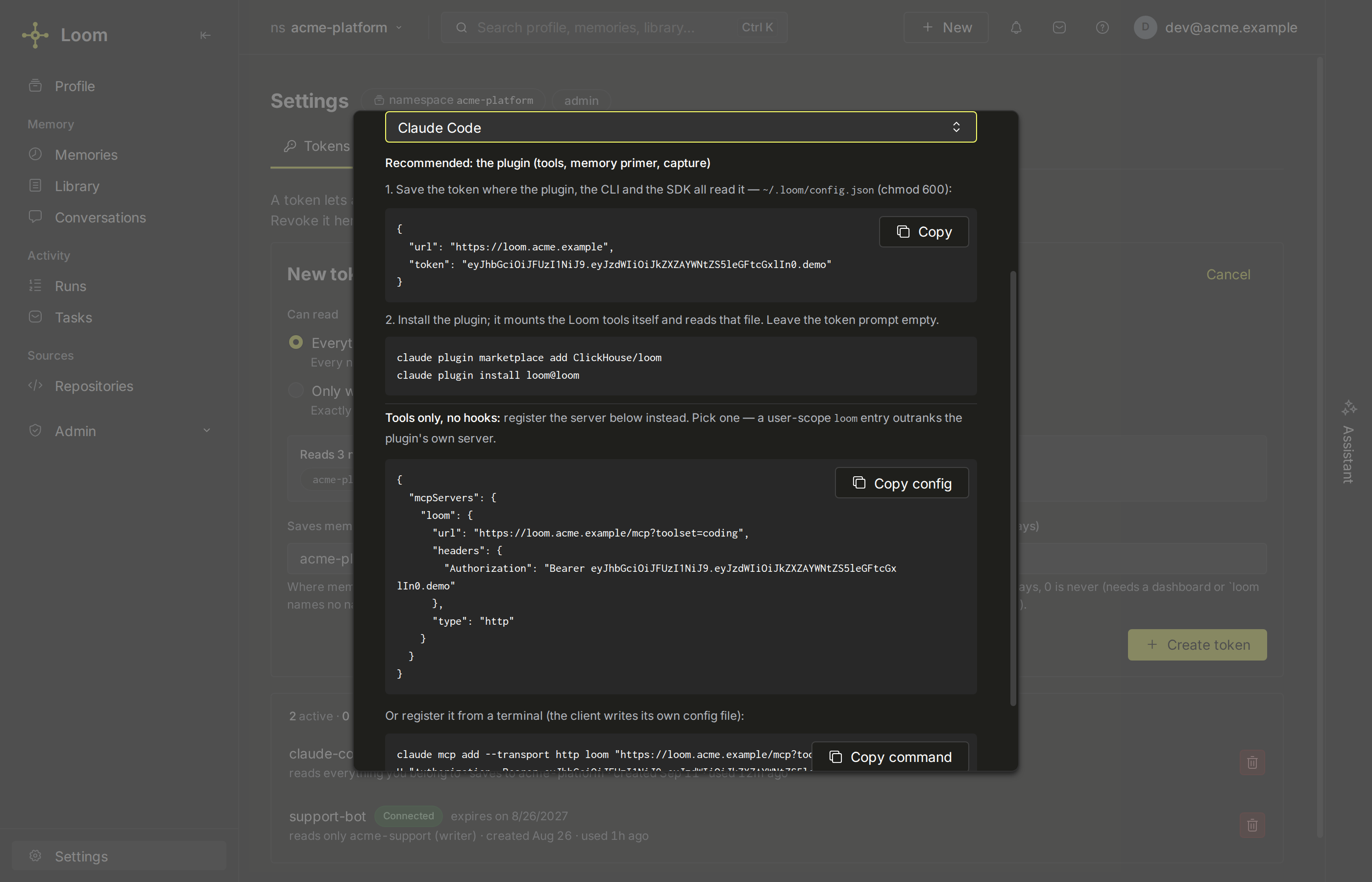
claude plugin marketplace add ClickHouse/loom
claude plugin install loom@loom \
  --config server_url=https://loom.example.com \
  --config token=<writer JWT>
Both --config values are optional; without them Claude Code asks once. Start a new
session. Loom's session primer arrives at the top, and from then on:
- the hooks send Loom what data handling lists;
- the
loom-memory,loom-code,loom-sessionand other skills tell Claude when to save a fact, when to search, and how to use the code index; loom_search,loom_memory_setand the code tools are available as MCP tools.
Everything the plugin installs, and how to configure it, is on the Claude Code page.
Codex
codex plugin marketplace add ClickHouse/loom
codex plugin add loom@loom
Then run codex interactively once and approve the plugin's hooks;
until then the tools work but nothing is captured.
The plugin's MCP entry points at http://localhost:7777. For another server, write its URL
and your token to ~/.loom/config.json and override the MCP entry in
~/.codex/config.toml, as shown in Codex: the server.
The Codex plugin ships the same hooks and skills; the differences are on the
Codex page. Don't also run codex mcp add loom with
the plugin installed: an entry with the same name replaces the plugin's.
Cursor and other MCP clients
For Cursor or VS Code against a single-user server on the same machine, no token is needed:
use the Cursor or
VS Code install link. Otherwise, in the dashboard,
open Settings → Tokens, fill in the New token form (press New token first if a
token exists) and press Create token, then choose your client (Cursor, VS Code, Cline,
Windsurf, Zed or Claude Desktop) under Connect: the dialog shows the entry for its
config file, with the token in it. For any other MCP client, copy the entry from
MCP clients. With the loom CLI installed
(pip install -e . from a clone of the repository), one command writes the entry instead:
loom install --client cursor --server-url https://loom.example.com --token "$LOOM_API_KEY"
Restart the client afterwards. --client also takes claude-desktop, vscode, cline,
windsurf and zed; without it, loom install wires every client it finds. These clients
get the tools; transcript capture needs a hook, which Cursor
has and the others take from a transcript template.
MCP clients covers toolsets and the entry the
command writes. Then add the agent instructions
block to a coding client's rule file, so the agent knows when to call the tools; for a
client other than Cursor, add ?toolset=coding to the entry's URL (--toolset coding
with loom install) so the tools the block names are listed.
Check that it works
- In Claude Code, run
/loom:loom-status. It reports the server the plugin calls, whether the token is accepted and can write the namespace, and any captured batches that never reached the server. - Tell the agent something durable, for example "our deploy window is Tuesday and Thursday only". In a new session, ask "when can we deploy?". The answer comes from Loom.
- Open the dashboard (
<server>/). The saved fact is there, and the session's conversation too while conversation recording is on; you can correct or delete either.
loom doctor --client adds the local wiring checks when you have the CLI.
When the code index is used
The plugin attaches the code index only when the session starts inside a git checkout of an indexed repository:
- It reads the checkout's remotes (
origin, thenupstream, then the others) and looks them up among the repositories the server indexes. A fork with no index of its own uses its parent's index. - You need read access to that repository's code namespace. The dashboard's Repositories page shows what you can read and lets you join.
- On a match, the session's code questions are scoped to that repository, and grep and whole-file reads of indexed paths are answered from the index as of its latest indexed commit.
- With no match (a directory outside git, a repository nobody indexed, or one you can't read), nothing changes: the agent reads local files, and memory works as usual.
To use a repository's index anyway, name it: LOOM_CODE_REPO=<owner>/<name> (for example
ClickHouse/loom, or just loom when one repository you can read has that name), the
Claude Code plugin's code_repo option, or "code_repo" in ~/.loom/config.json (the
setting a Codex session reads). It is a fallback: outside any git checkout, or in a
checkout whose repository has no index (a mirror with a different URL), the primer names
that repository's namespace and every loom_code_* call defaults to it. Inside an indexed
checkout, the checkout's own index still wins; to search another repository, pass its
namespace to the call. local_first (LOOM_CODE_LOCAL_FIRST=on) keeps
the index out of grep and file reads, for example while you work on uncommitted changes.
Details: Claude Code.
No token yet
On a server started with LOOM_SELF_SIGNUP=open, the first Claude Code session that finds
no token signs the machine up. It writes the token to ~/.loom/config.json (mode 0600)
and a claim code to ~/.loom/claim-<namespace>.txt, and the primer says how to claim the
namespace: the code works once, at the server's /oauth/agent-claim page, with a password of
your own. LOOM_AUTO_SIGNUP=off turns this off. A server without
self-signup leaves the session without a token, and the primer says how to get one.
Next
- Your first agent: the same memory from your own code with the SDK.
- Agent integration: what to save, when to search, and mistakes to avoid.
- Code index: ask Loom about a repository the server indexes.
- Troubleshooting, starting from
/loom:loom-status.