The dashboard
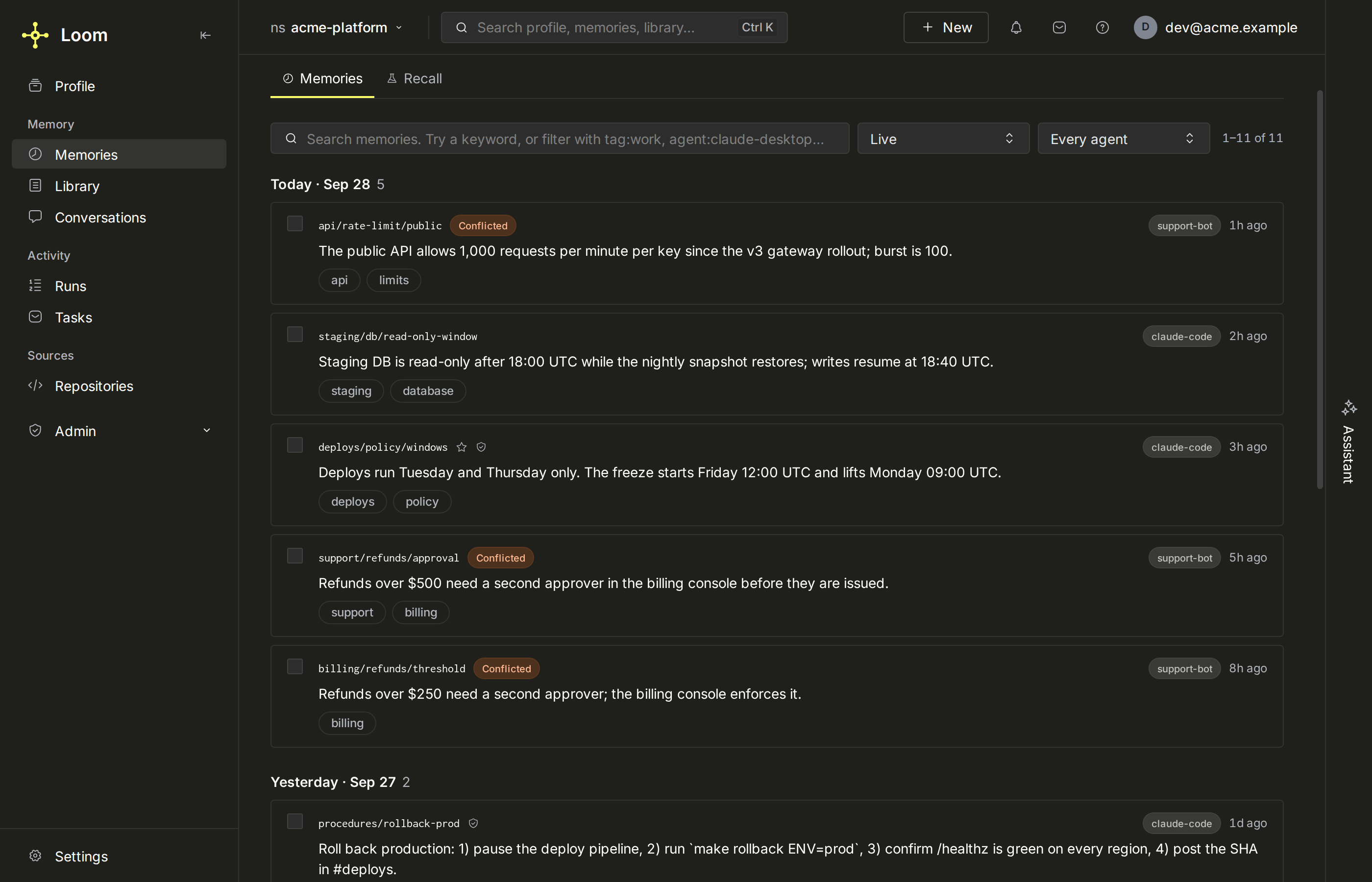
The dashboard is a React single-page app the Loom server serves at its root URL. It calls the same operations agents call, with the signed-in person's token, so it shows what that person may read and nothing more. It is where people decide what Loom leaves to them: conflicts, proposals, triaged tasks, grant requests and policy modes.
Serving it
The server serves the built bundle from frontend/dist/. Without a build, every dashboard
page answers 503 with Dashboard not built. Run npm --prefix frontend run build or
use the published Docker image.
The server origin is the dashboard: open http://localhost:7777/, and a page's URL is
the origin plus its path (<server>/settings). The API (/v1/*), MCP (/mcp), OAuth
(/oauth/*, /.well-known/*) and the bundle's own files (/assets/*) keep their paths;
no page uses them.
| How you run Loom | What to do |
|---|---|
| The published Docker image | Nothing: the image's frontend stage runs npm ci and npm run build. |
From a checkout (make server) |
make frontend-build (or npm --prefix frontend run build) once, and after frontend changes. |
| Working on the frontend | make frontend-dev: a Vite dev server on :5173 that proxies /v1 and /mcp to :7777. |
LOOM_DASHBOARD_REDIRECT_URL, when set on a deployment that requires auth, makes a dashboard page load
redirect (302) to another entry point instead, for a Loom that sits behind an
aggregating front end. /me, where a sign-in lands with its token in the URL
fragment, is the exception: it always serves the page, so the token never
follows the redirect to another origin.
Signing in
Sign-in depends on the deployment's identity mode:
| Deployment | What the person sees |
|---|---|
Auth off (LOOM_AUTH_REQUIRED=false or LOOM_IDENTITY_PROVIDER=single-user) |
No sign-in. The page serves the one namespace LOOM_DEFAULT_NAMESPACE names (local by default). A laptop mode only. |
| Auth on, password accounts | Sign in with an email or namespace and a password; the server mints the token and the page stores it without showing it. |
Auth on, LOOM_SELF_SIGNUP=open |
A Sign up tab creates an account on a fresh namespace. |
Auth on, LOOM_OAUTH_LOGIN_PROVIDER=oidc |
One Sign in with SSO button to the identity provider (single sign-on); no password or sign-up form. |
A token minted with loom mint-token |
Open <server>/me#token=<jwt>, the sign-in landing page, which never redirects. The page scrubs the token from the URL and asks to confirm the account it names, unless it names the account already signed in. A ?token= query is ignored and removed. |
Behind a reverse proxy that adds Authorization |
The page sends no token of its own; the proxy's header authenticates every call. |
A #token= link signs this browser in as whoever the token names, so the page stores one
without asking only when it answers the SSO sign-in this tab started from the sign-in screen
within the last ten minutes, or when it names the same subject and org as the token already
held. The sign-in screen sends a nonce it keeps in the tab to /oauth/sso?n=<nonce>, and
the server hands it back as /me?n=<nonce>#token=<jwt>; a token without that nonce, such as
one from an SSO sign-in started by typing /oauth/sso, is not the tab's own. Any other
link's token is first asked about with whoami: one the server refuses is dropped without
asking, and one it accepts waits on a screen that names the account the server says it signs
in as, and the account the browser is signed in as: Sign in as … stores it, and
Cancel drops it and keeps the session the browser had. Until then the token is held only
in the page's memory. A same-account token is stored only once the server accepts it, so a
refused one leaves the held token as it was. /me?sign_in=sso opens a sign-in screen that
starts SSO by itself with a nonce of that tab's own when a Loom page sent the browser there
(the server reads the load's Sec-Fetch-Site, or its Referer from a browser that sends
none); from another site, or typed, it shows the Sign in with SSO button. Sign in in a
new tab on the session-ended card opens it, and so does Start again when the server
could not finish an SSO sign-in. A #token= link behind a proxy that adds Authorization,
or with auth off, is dropped without asking.
loom init --agent NAME signs an agent up on its own and prints a claim code a person enters
once at /oauth/agent-claim, with a password of their own, to claim the namespace; they then
sign in here with the namespace name and that password. The token sits in the browser's local
storage; a stored token the server refuses (expired or revoked) ends the session on the next
call, from any page, and so does another tab dropping the token; a sign-out in another tab
reloads this one to the sign-in screen instead. Mid-session a card among the toasts says so,
over any open dialog (a pointer reaches it at once; a keyboard user closes the dialog to reach
it), and the page stays as it is. Sign in in a new tab signs in there, and this tab uses
the new token: a token another tab stores for someone else reloads the page as soon as the tab
hears of it, and no call of this page goes out under it; for the same person, the card goes
away once the server accepts the token. Reload signs in in this tab instead. While the page
loads, a refused token shows the sign-in screen saying the session ended. When that token was a
sign-in session's, with SSO on, the screen starts the sign-in again by itself (once in five
minutes per tab), so a person still signed in at the identity provider returns to the page they
were on. A minted token, and a refused #token= link, wait for a click instead, since either
may be the way in while the identity provider is down. Sign out forgets the token here, and
ends the server-side session of a sign-in session's token (the dashboard's SSO token, or a
loom login access token opened with #token=). A minted token opened with #token= is only
forgotten here: it may be the one a CLI or CI job uses.
The pages
The left rail groups pages into Memory, Activity and Sources. Every page has its own URL that can be shared.
| Page | URL | What it is for |
|---|---|---|
| Profile | /profile |
The always-loaded context every AI client receives (profile.*), which clients read it and how (profile.activity). |
| Memories | /memories |
Browse and search the namespace's memories, open its guide from the header, with its history (who changed it, when and why); open one to see its versions, provenance and verification, add or edit, and restore a deleted one within its recovery window. Its Insights button opens the Ask AI panel on its starters, which read the namespace as a whole. For someone who can write there, an empty namespace, when the account reaches only its personal one (with auth off, any empty namespace), shows Getting started above the list, and it comes back on later visits, as one line with Continue once the namespace holds memories, until it is hidden or every step is done: connect an agent (the token form opens in place; the step ticks at the token's first call or an agent's first memory here), the first memory, and, for whoever can set them, the models while none is set (the list says all set only once they are; after both steps are done, Settings › Models & keys sets them). Each step ticks from what Loom holds; Hide keeps it hidden for that account and namespace in this browser. |
| Recall (tab of Memories) | /recall |
"Why did this rank here": the rows the Memories list shows for a query with no filters set, in its order (keyword matches newest first, then memory.search hits with their ranking terms), and read past searches with every key and score they returned (memory.search_trace_log). |
| Library | /library |
Knowledge documents: add (a file, which is uploaded for the server's extractor, badged beforehand with the format knowledge.formats says it is read as, and whose ingest is followed to the revision it publishes, with Stop ingestion while it runs, knowledge.ingest_cancel; several files at once, picked or dropped, each its own document followed in a list with Retry failed and Stop (many files); a folder, which becomes a collection with its folders nested inside it (on My files or a namespace, the person picks a top-level collection or files kept with their folder paths) (a folder); or pasted text), preview, download, edit metadata, delete (the notice it raises carries Undo, knowledge.restore, which restores the document's last deleted revision, whichever delete retired it; a bulk delete's notice has none), review the typed tables a document's file became from its preview's Tables and approve their column types (knowledge.dataset_get, knowledge.dataset_approve), and find a passage inside the documents (Find a passage, knowledge.search; each hit is cited by its revision and place, in lines, a key, pages or slides, or rows, and opens its document). A select above the list shows the namespace picked at the top or one of the collections the person can read (collection.list), as a tree with each one's title and description (its col-… address in About this place; a title shown twice carries its address); ?collection= names it. Beside the select, a collection's path from the top on one line: the place above, the ones above the parent folded into a dots button, and the parent, each a link (a parent the person cannot read shows as a dots button, which gives its address when tapped), and below the documents Collections lists the ones inside it, or, on My files and on a namespace, the person's own top-level ones (and their own whose parent they cannot read), with Shared with you below them: the collections the person reads or writes but does not administer (one inside another shared with them shows inside it), each list naming the parents of a collection inside another, in words for a parent missing from the list (collection.list names no owner, so one shared as admin sits with the person's own, and the role is the token's: a token capped below admin lists the person's own here too). Each list shows the first six, then fifty more at a time; on a phone the path is one back button beside the select, and the select, a tree, lists the collections inside. On a code or tracker namespace, or none, the select lists only collections; with no namespace at the top, the Library opens My files (a token that is not a person's has no files of its own: it stays on the top level, which lists the collections). Its menu manages the members (grants.*) and, for its admins, moves it under another collection or to the top (collection.move) and deletes it, which erases what it holds (collection.delete); New collection creates one from a title, inside the one shown when the person writes there; the server derives its address, and a title already used inside the same collection (at the top level, one of the person's own) opens that one (with Choose the address myself, the title is kept as given) (names and titles). The header's New adds to the header's namespace, so while the Library shows a collection, or a namespace that holds no documents, it offers no Document: the Library's own Add document adds where the Library shows. The select finds a collection by its title, address or description as you type. See knowledge. Sources, in the header's actions and counting them (its icon alone on a phone), opens the document sources of the shared namespace or collection in view below the header, with their last sync; its admins add, check, sync, rotate and retire them. |
| Conversations | /conversations |
Stored conversation threads, replayed turn by turn (a writer renames a thread, an admin deletes one), and the saved session briefs, which a writer forgets. See conversations and sessions. |
| Runs | /runs |
The run ledger: goal, how it ended, what it relied on and wrote, and in the replay what it recalled, observed and cost; a writer grades a closed run by whether it held up. See runs. |
| Tasks | /tasks |
The task inbox board. Tiles count what needs a person (triage, blocked on a person, failed, leases about to end); rows group as Triage, To do, In progress, Waiting, Closed, as a list or a board, with Accept / Won't do inline; the panel's buttons or a drag onto another group move a task. See tasks and decisions. |
| Repositories | /repositories |
Indexed code repositories, each with Health, Explore, PR packs and Access tabs, and the org's trackers; a branch's admin re-indexes it after one of its commits. An opened repository lists its documents and their sources, each with its last sync; a source's name opens its settings, sync state and the documents it wrote (knowledge.source.inspect), and a caller with the role the sources table names adds, checks, syncs, rotates and retires a source there. See code index and tracker. |
| Settings | /settings |
Tokens (one form for every token: what it reads, where it saves, its expiry; the setup for each MCP client or a script; the list, with what each token reads); Memory (?tab=memory: patterns never to save, each with a sweep of the memories it already matches, seeding memory from a document, and the webhooks that receive its memory changes and their deliveries); Structure (?tab=structure, on a memory namespace: the record schemas, each one's records and disagreements with the record each disagreement superseded, the profile schema, the graph ontology and the categories; an admin registers and approves schemas, sets or clears the profile schema and accepts and adds ontology terms, a writer adds categories); and Models & keys for a platform admin. |
Three views are reached from elsewhere rather than the rail: Namespaces in your org
(/spaces, the namespaces you manage and the org's public namespaces to join, with each one's
guide summary, and the guide itself for
a namespace you belong to, opened from the namespace picker), Graph
(/graph, the entity graph explorer, opened from an entity; see
entity graph) and Help (/help?page=<page>#<section>, a page of
Loom's documentation as the running build ships it, read with help.get under the
signed-in session, where an assistant answer's help citation leads; links between pages
stay on it).
On Namespaces in your org, a search for the exact name of a namespace the list does not show offers Request access, which is how a private namespace is asked for by name; a repository's or collection's name points to Repositories or the Library instead.
A page with nothing to list says what will appear there and offers the action that fills it. Memories are filled by an agent or by hand; runs, conversations and connected clients only by an agent. Where an agent fills it, Connect an agent opens the token form in a dialog on that page (with auth off, the plugin's install lines), so connecting needs no trip to Settings; Conversations offers it only while Record conversations is on. It is offered only to someone who can write in the namespace; a viewer's empty Memories, Runs or Conversations page says who can fill it instead. Where only an operator or an admin fills it, the page says so, and names a deployment setting only to whoever runs the deployment (a platform admin, or anyone with auth off). A viewer's empty Memories page also opens the namespace's members, where its admins are listed.
A control your role cannot use stays in view, unavailable, and says what it needs and who grants it: "Needs writer on team. An admin of it can grant that." Choosing it sends nothing. While your role is still loading the control says that instead, and a control gated on the token's own claim says which claim it needs. A control whose role the dashboard cannot know says the server decides and stays unavailable, except the Library's writes on a memory namespace, which stay available and let the server decide. A list's selection, which holds only its bulk writes, shows only where they are available: the Library's for a role that writes or is the server's to decide, the others' for a role that writes. This holds on every page, with these exceptions, offered only where the dashboard can tell the token may use them: the Library's Sources section; on Repositories a repository's Docs and Sources facets and a tracker's record sources; a repository card's maintainer controls (its Settings, a branch's Re-index and Remove branch, and Add branch); and a tracker's Edit mapping, Rotate and Retire. The repository's Access tab shows a reader its access controls with their reasons. A restricted namespace's own gate (a token of its org that names it, and a direct grant) is checked by its settings, its budget cap, a repository's Access tab and Refresh now; its other controls follow the role, and the server refuses a token that gate does not admit. The header's New menu (below 768 px the New group at the top of the phone's More sheet, so the top bar stays one row) follows the role the dashboard knows, and the server decides the rest. On a repository's namespace, a member's memory writes (add, and edit or delete a row) stay available whatever its role, and the server checks that the row is the member's. Only what is for the org or the platform rather than a namespace is left out: the platform pages, Health's Workers, Operation mix and Projection failures tabs, Settings › Models & keys and the admin drawer's navigation.
Ask AI
The Ask AI button in the header, right after the search field (its icon alone below 1280 px), opens the chat with the assistant on every page, and closes it again while it sits beside the page; no key opens it, and the search is the other way in. Its tooltip says what it does, with the reason it cannot answer when one is known; it looks pressed while the panel is open. After Skip to main content, a second skip control, Go to Ask AI, opens it with the focus in its field. The button is never disabled; its icon and name say when an answer is coming in, when one ended unseen, with the panel closed and not shown in the search's card (until it opens again; a reload forgets the mark), and when the assistant cannot answer, in which case the panel says why. On a deployment whose chat is not set up it keeps its plain icon: the panel then holds the starters, Loom's own reads.
The panel has one header row: the title, Ask AI, and the namespace in muted text, then icon buttons, each named and with a tooltip: New chat (unavailable while an answer is coming in), History (pressed while History shows), Expand (from 1024 px) and Close; once the session has ended only Close stays, over the line that asks to sign in again. The chat asks about the header's namespace under the person's own access: the answer streams in as text with Markdown emphasis, lists, tables and code (no HTML, images or links), each citation drawn as a number by where it first appears, as the search's card numbers it, then its Sources, one row per citation as the server checked it, led by the same number, which in the text links to its row once the check ends, named as the reader knows it (a memory by its key, with its kind and version in the row's tooltip), a memory, document or help citation found in Loom opening where the dashboard shows it (a help citation on the Help page at its section) and any citation not found reading "not confirmed" with why, and a label for the answer's support, none on an answer that makes no claim, such as a greeting or an abstention. While it answers, its working line names the latest call it made ("Read the audit"), or "Answering…" before the first; a call that failed or was refused reads "Couldn't read …", muted. Under the finished answer the disclosure What it read (n) lists every call (see steps). Stop ends an answer; closing the panel or leaving the page does not. Once the text is complete Stop goes, and the answer shows "Checking sources…" until its check ends; the next question waits for that check. An answer whose check never came back (the connection was lost, or the page was left) reads "Check didn't finish". Each question goes with the conversation's newest 50 messages.
An answer's actions are small named icon buttons under it (44 px under a coarse pointer). Copy copies a finished answer as stored, Markdown and citation markers included. The last answer offers Ask again, which answers its question again in its place with the page line it was asked with, after it ended or was stopped. An answer that failed says so in one sentence, "The answer stopped before it finished. Your question is kept." for a stream cut short, with Retry inside the alert where sending it again may pass (the server marks the error retryable, or the connection was lost); its partial text keeps its numbers, unlinked. Edit question, an icon button on the last question, puts it in the field while the field is empty; Ask then replaces its answer (with sources when it was asked with them), and Cancel edit empties the field; while an edit is open, Ask again and Ask again with sources are not offered. Enter in the field asks and Shift+Enter adds a line. A label that could not confirm the last answer offers Ask again with sources, which asks it again with "Cite your sources." after it, shown with a "With sources" tag. A starter's turn asked again reads its card again.
A question asked again replaces its answer only once new text comes: until then the turn stays as it was, and a refusal the panel explains, or an edit that did not go, offers Try again (see asking again).
An empty chat shows one line about what Ask AI answers, its starters, and, under the field, "Chats are kept in this browser for 30 days." when the chat is saved: for a signed-in person whose browser lets the dashboard store it (not with auth off, and not where the browser refused, which the panel says instead).
Starters list in an empty conversation, whether the assistant can answer or not, as
full-width rows, the page's own first (documents on the Library, relationships on the Graph,
a user's memories on Profile and Conversations): four, three on a phone, and the disclosure
More questions shows the rest in place. They cover what the namespace holds and who
appears in it (namespace.inventory), how it is used (the audit over the last 7 days,
namespace.audit), what a user, agent or session remembers
(memory.inspect, with a
form for the id that suggests the users and agents an inventory card found), what its
documents are (knowledge.inspect), what
Loom would advise its most active writer (mentor.brief), how an entity and its neighbours
relate (a link to the Graph) and what could be improved
(namespace.tune). A
starter reads its card with the person's own token, gated on that read's own role and
token scope, and shows it in the conversation: Loom's own read, so exact and with no model
call, marked "Loom's own read ·
A draft's action is the person's own click on the existing write, under their role: a category draft is registered behind a confirmation that shows the current and proposed description; a guide draft opens in the guide editor on top of the guide read now, on its conflict view when the guide changed since the draft was read; any other draft is copied, its "How to apply" saying who applies it and where. A card restored from History shows "Read
The Memories page's Insights button opens the panel on the starters, with nothing asked
(also where the chat is not set up: the starters read Loom without it): over a finished
conversation it starts a new one; while an answer is coming in it opens on that conversation
and says to choose New chat once it ends. On a phone the button is left out, and the top
bar's Ask AI opens the panel, which shows the starters on an empty conversation (New chat
starts one). An old link to /memories?section=insights opens the panel on the audit's
card, nothing asked.
Each question says which page it is asked from, and shows it: a chip above the field,
"Includes: Memories", sends one leading line with the question (Context: Memories page),
which the transcript shows as the chip, not as text. Its remove button, Don't include this
page, sends nothing about the page for that question; the next question, or another page,
carries the chip again. The chip's tooltip says the question names the page and that ×
leaves it out. Ask about this adds the item to the chip for one question ("Includes:
Memories · key user/pref/lang"; the line names the memory's key, writer agent and the user
and session it is filed under, the document's source URI and title, or the result's rank,
key and the query its rows came from, each quoted). It is in the memory drawer's footer
after Edit, in the document preview's actions before Download, and on each Recall lab result
row as Ask. It closes the drawer or the preview without handing the focus back to what
opened it, opens the panel in the mode the window gives with the focus in its field, keeps
the question being typed and sends nothing. The item leaves with the chip, after the
question is answered (one the route refuses comes back to the field with its chip), and when
the page, the namespace, the org or the signed-in person changes. On a conversation about
another namespace it starts a new one in the header's namespace, the question being typed
and the chip moving to it, and says "New chat in
One panel serves every window width:
- Beside the page from 1280 px, the page keeping at least 640 px: 360 to 720 px wide (420 by default, and narrower before it covers the page), resized by its splitter's drag or arrow keys (a wider grab strip under a finger), and not modal, so Tab moves between the page and the panel. A navigation leaves it open.
- Over the page below 1280 px: full height at the right, the page dimmed and inert, the focus kept inside until it closes. A navigation, Back and Forward close it.
- Full screen under 640 px, with a history entry of its own: Back closes it.
- Expanded from 1024 px: Expand makes the open panel a window over the page, anchored at the right and full height, leaving a 24 px strip of the dimmed page at the left; its content keeps a reading width. The address, the history and the page under it do not change. Collapse, Esc or a click on the strip returns it to the mode the width gives; Close closes it, and the next open is docked. A navigation from it (a link in a card, Back, Forward) leaves the window first: beside the page the panel stays open, over it the panel closes. A window narrower than 1024 px collapses it.
Esc closes it from inside (after any menu or popover open in it), returning the focus to Ask
AI (expanded, Esc collapses the window). A change of width moves the panel to another mode
without losing the focus or the question being typed. It reopens on reload only where it
sits beside the page, never expanded. A bookmarked /assistant address lands on the
account's landing page and opens the assistant over it (expanded from 1024 px).
Chat not set up (no assistant URL, or readiness says so) is one empty state: its icon, "Chat isn't set up", "An operator sets up the assistant service for this deployment.", and a link, How to set up the assistant service, to the deployed assistant in the docs. Loom's own reads are listed under it as starters, with no question field and no Also ask the model, and the starters stay under the last card, so one runs after another; those cards are not saved, and New chat empties the list. History shows only conversations saved before, opened read-only. An open puts the focus on the first starter. A setup that is failing has the same layout, headed "Chat's setup is failing", with Try again; a platform or namespace admin also gets a link to Admin › Health, where the failure is shown, and anyone but a platform admin reads that an admin of this deployment fixes it. The line that Loom can still answer from its own reads shows only while the starters do.
Why it cannot answer is said for the person reading it, with a link only for someone who
can open the page it names: the assistant not set up, setting up or failing its setup
(/v1/health/ready's assistant check, read when the panel opens and every 10 s while it
sets up or fails; a read that takes over 10 s counts as failed, and the chat route's refusal
then decides), and the chat route's refusals by their detail.reason: auth off, an org-wide
or narrowed token (also read from the token's own claims), a token that expires before an
answer could finish, and model calls switched off for the org (see the
bridge). Try again
reads readiness again and asks a refused question again once nothing refuses it, with what
the chip shows then; when the chip's line would make it longer than the route accepts it
sends nothing, leaving the question in the field, which says why, or, with other text there,
saying why in the panel. Health shows the same check as its Assistant row, once
readiness can be read: to platform admins always, and to anyone else who opens Health while
the assistant sets up or fails.
The header search answers a question in place. Its results end with an Ask AI about
"tag:, namespace:, type:), that option comes first
instead. After keywords it follows the results once the memory search answers, so an Enter
before then asks nothing. No option shows a key, and Tab leaves the field as it does
anywhere. Typing never asks: choosing the option (a click, or Enter while it is highlighted)
asks the question through the assistant as the panel's Ask does, in the conversation
shown when it is about the header's namespace and otherwise in a new one, with the page's
line (none once the panel's page chip is removed) but without an item Ask about this set
for the panel's field; what is typed in the panel's field stays. A card headed Ask AI
then sits on top of the results, which stay listed under it: the answer's first lines as
they stream, each citation in them drawn as its number that, once checked, links to its row
under the card, its working line, and once checked the label and sources the panel shows (on
a phone, 44 px rows with their text centred); its end is said once in the assistant's live
region. Its one action, Continue in chat, the first option under it, opens the panel on
that conversation, the question and answer its last turn. A question the card could not ask
(another answer coming in, or another tab holding the conversation) waits in the panel's
empty field. Closing the search while it answers leaves it answering: Ask AI shows the
answer coming in, then ready. Where the chat is not set up, a reason keeps the assistant
from answering (the token's own claims included, and a refusal the route gave earlier; the
setup starting or failing keeps the option, and the card says a refusal it causes), the
header's namespace is not a memory namespace (a code, tracker or collection one), or the
question with its page line is longer than one request carries, the search offers no Ask AI
option. Where it can be offered the empty field reads "Search or ask a question", and while
it is offered, a search that matches nothing says no "No matches" and gives no filter tips.
Conversations are kept in this browser, never on the server: 30 days from their last use, the newest 25 turns of each, up to 256 KB a conversation and 2 MB in all, and listed under History only for the person and token scope that asked them and the namespaces their token reads. History is the panel's own view: its header reads History after a Back to the chat button, the chat shown is marked, and choosing a row opens it. Each row's menu holds Delete; at the end the privacy line and Delete all chats, confirmed inside the panel. With no one to save chats for (auth off, or a session whose whoami names no subject), History shows "Chats aren't saved in this session." Signing out, or another person signing in, deletes them; a session that expired only hides them until the same person signs in again, and no other tab can write a deleted one back.
One answer runs in a conversation at a time, across the browser's tabs. Ask in a conversation another tab is answering in sends nothing, says so, and leaves the question in the field; the other tab's answer appears here once it ends. Where the browser has no Web Locks (a page served over plain HTTP, not from localhost), each tab answers on its own, every save keeps the turns another tab finished, and an answer still unfinished an hour after it started shows as stopped.
A page's address and its namespace
A page's URL names the namespace it shows, first in its query
(/memories?namespace=team-notes&memory=api%2Frate-limit), so a reload or a shared link
shows the same namespace.
- A link's namespace opens in that tab when the account can read it: a namespace its token claims, or one it holds an active grant on. It is never saved as the picked namespace.
- A namespace the account cannot read, a pending request included, opens a page that says so, with the namespace picker in the header and a way to continue in the default namespace. Nothing of the link's namespace is read.
- A link whose
?namespace=is a collection opens that collection in the Library (?collection=), on the default namespace: the header never holds a collection. - A URL without
?namespace=opens the default namespace: the saved pick while the account can still reach it, else a namespace it administers (its personal namespace first, then its oldest admin grant), else its first claimed memory namespace; a benchmark namespace only when nothing else is reachable, and a collection never. A token that reaches only repositories and tracker records opens the first of those on the pages that need no memory namespace; a memory page then opens on none and says so. An account that reaches no namespace but reads a shared collection (ascollection.listsays, or by a grant of its own when that cannot be read) lands on the Library; a person's own collection alone does not count. - When the membership read fails, a link to the saved pick still opens, since the server
answers its reads, and any other link opens a page that says its access could not be
checked, with Retry and a way to continue in the default namespace. A URL without
?namespace=then opens the saved pick only when the token claims it, else its first claimed namespace. - Back and Forward never switch namespace: an entry made in another namespace opens nothing it names, and the address names the page's namespace. The one exception is Back from a tracker's Patterns board, which returns to the namespace its Open left.
- On the bare root, a default memory namespace opens on Memories (the landing rules
above give the rest), and
?view=names another page by view id or path (/?view=memories,/?view=admin/health) and?memory=<key>opens that memory on Memories. - A single sign-on started on a page returns to it, within ten minutes.
- The namespace picker lists namespaces only, each with its description, and folds
repositories, tracker records and every three or more memory namespaces whose names
share a prefix into groups of their own. A uuid in a name counts as one part, so names
built as
<kind>-<owner uuid>-<id>fold per owner. A namespace someone just shared with you is badged New until you pick it there (namespace.mark_seen). A collection is never listed there, nor in header search, Namespaces in your org or the copy dialog's targets: it is known by its reservedcol-name, and the picker's footer links to the Library, where collections are. Find public namespaces to join follows your namespaces until you have joined one; afterwards, and while you search, it is in the footer. The footer also says in one line what a namespace holds: memories, code or tracker data.
The admin drawer
Admins of the current namespace get a drawer with the Review and Observe groups; org and platform admins also get Access, and platform admins Deployment. A viewer never sees an entry that would answer 403.
| Group | Page | URL | What it is for |
|---|---|---|---|
| Review | Review queue | /admin/review_queue |
Conflicts (pairs of memories that disagree, each with a suggested decision on request, except a sensitive one), learnings proposed for promotion, memories Loom retired on its own (Auto-resolved, each with an Undo), exceptions (the allowlist of pairs that may coexist), proposals (facts on trial, accepted or rejected), and duplicate memories and documents with the namespace-wide repairs. Shown in the drawer only while a conflict waits or Loom retired a memory in the last 30 days; the URL always resolves. See conflicts and refusal. |
| Review | Guardrails | /admin/guardrails |
Blacklist patterns: content Loom should never store, each with a sweep that deletes the stored memories it already matches; for an org admin, the org's and the namespace's extraction rules and the org's model-call switch. |
| Review | Policies | /admin/policies |
History policy rules, a dry run of a hypothetical call, and the decision ledger. |
| Observe | Health | /admin/health |
Worker status and how agents in the namespace spend their calls; the namespace's memory report, search gates and recent extractions; an admin's repairs (apply expiry, re-embed, remove an extractor's facts, roll back, snapshot and restore); an org admin's projection failures, retried or dismissed. |
| Observe | Audit log | /admin/activity |
The audit feed, one readable line per event; the Erasures tab lists erasures with each one's details and, by role, erases or exports one namespace or one user; the Exposure tab shows which readers read the namespace's memories and one user's owner report. |
| Observe | Flow | /flow |
Read-only: where memories flow — writes and recalls, cross-namespace reach, producer and consumer agents, memberships; collections and repositories are listed apart from the namespaces. |
| Observe | Usage | /admin/usage |
LLM and embedding cost by day, operation, agent or user, the namespace's daily cap, and on Coding agents the coding agents' own model spend. |
| Observe | Agents | /admin/agents |
Which clients connected in a window (agents.connected); confirms a new MCP connection works. A namespace admin can forget every memory one agent holds there. |
| Access | Users | /admin/users |
Org and platform admins only: every subject, their grants (namespaces, collections and repositories) and roles, last activity, and releasing a namespace whose owner lost their password. |
Badges draw attention without a rail entry: the Review queue appears with its conflict count, or with no count when there is no open conflict but Loom retired a memory on its own in the last 30 days (the Auto-resolved tab), Usage warns when the namespace is over its 24-hour cap, Agents counts clients new in the last 24 hours. The header carries a task bell (triage and blocked-on-person items) and a pending-approvals bell (grant requests the person can decide). The phone's More sheet lists the same admin entries with the same badges; a badge whose read fails is hidden.
Operations the dashboard uses
The dashboard calls public operations (memory.*, conflicts.*, task.*, namespace.*, …) with the person's own
role; an integration with the same grants can do everything it does. ui.vitals, the caller API (/v1/me/*) and the /v1/admin/*
routes serve the dashboard; they are not an integration surface.
ui.vitals(hidden from MCP): one row per page view with the route, largest contentful paint, long tasks, DOM size,/v1call count and build, posted when the person leaves the view. The operation ledger row is the record;loom deploy-deltareads it per route before and after a deploy.- The caller API's
/v1/me/*routes (the namespace default, sharing summary, service accounts) and/v1/admin/*routes (worker status) are HTTP endpoints outside the operation registry.
Limits
- Dashboard pages answer 503 until
frontend/dist/index.htmlexists. - In auth-off mode there is no namespace picker: the page serves
LOOM_DEFAULT_NAMESPACEonly, never persists a different pick, and ignores a URL's?namespace=. - Choosing a namespace in the picker also saves it server-side as the person's default,
so a sign-in and a
*token that names no namespace before*pick up the same namespace on their next call; a list token saves where its mint recorded (tokens and grants). A link's namespace is never saved. - A token whose namespaces claim is
*reads namespaces the picker does not list; a link to one of those opens the page that says the account has no access. - The rail's links carry no namespace: one opened in a new tab shows the saved pick.
- Admin badges poll only for a confirmed admin of a memory namespace; a code or tracker namespace has no conflicts or budget to count.
Related
- Quickstart — boot the stack and open the dashboard.
- Tokens and grants — minting the token a sign-in uses.
- Namespaces and sharing — roles, joining, the mentor.
- Security architecture — identity modes and the proxy deployment.